 openspp.org
Alerts overview
Contents
Alerts overview#
This guide is for implementers setting up automated monitoring rules in OpenSPP. You should know what conditions you want to monitor but don't need programming knowledge.
Mental model#
Alerts in OpenSPP have two layers:
Layer |
What it does |
Example |
|---|---|---|
Alert rule |
Defines the condition to monitor |
"When stock drops below 100 units" |
Alert |
Generated record when the condition is met |
"Warehouse A stock is 45 units (below 100)" |
Think of it like a smoke detector: the rule is the detector (always watching), and the alert is the alarm that goes off when smoke is detected.
Key concepts#
Rule types#
OpenSPP supports two types of alert rules:
Type |
What it monitors |
Example |
|---|---|---|
Threshold |
Numeric field crosses a boundary |
Stock level drops below 100 |
Date/Deadline |
Date field approaching or passed |
Contract expires in 30 days |
Threshold rules#
Monitor a numeric field against a comparison value:
Field |
What it means |
|---|---|
Monitored Field |
The field to watch — must be a numeric type (Integer, Float, or Monetary) |
Operator |
Comparison type |
Threshold Value |
The boundary number |
Available operators:
Operator |
Meaning |
Alert when |
|---|---|---|
lt |
Less than |
Value < threshold |
lte |
Less than or equal |
Value <= threshold |
gt |
Greater than |
Value > threshold |
gte |
Greater than or equal |
Value >= threshold |
eq |
Equal to |
Value = threshold |
Date/deadline rules#
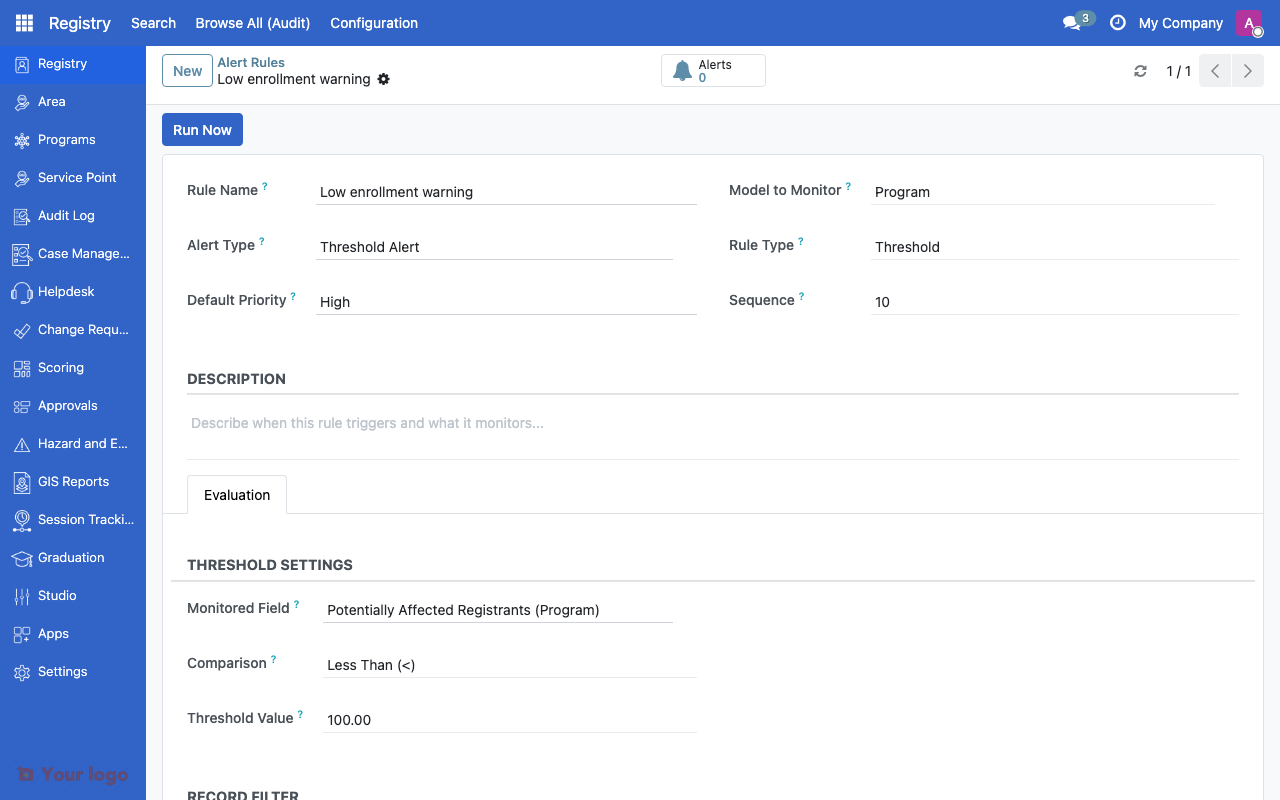
Alert rule form showing threshold configuration with monitored field and comparison operator.#
Monitor a date field for approaching deadlines:
Field |
What it means |
|---|---|
Date Field |
The date field to watch |
Days Before |
How many days before the date to trigger the alert |
For example, setting Days Before = 30 on a contract expiry date field creates alerts 30 days before each contract expires.
Common fields#
All alert rules share these settings:
Field |
What it means |
|---|---|
Name |
Rule description |
Alert Type |
Category (from vocabulary, e.g., "Stock Warning", "Deadline") |
Model to Monitor |
The type of record to watch (e.g., Programs, Entitlements, Contracts) |
Priority |
Low, Medium, High, or Critical |
Sequence |
Evaluation order (lower = first) |
Active |
Enable/disable the rule |
Domain Filter |
Only monitor records matching this filter |
Company |
Scope to a specific company |
Domain filter#
The Domain Filter field lets you narrow which records a rule monitors. You build filters using the filter builder — click Add Filter and select conditions from the dropdowns. For example:
Monitor only active programs: set "Active" equals "Yes"
Monitor only a specific warehouse: set "Warehouse" equals the warehouse name
Monitor only high-priority items: set "Priority" is "High" or "Critical"
Leave the domain filter empty to monitor all records of the selected model.
Setting up alert rules#
Step 1: Create a threshold rule#
Navigate to Alert Rules
Click Create
Set Rule Type to "Threshold"
Select the Model to Monitor (e.g., inventory, budget)
Select the Monitored Field (must be a numeric field: Integer, Float, or Monetary)
Choose the Operator and Threshold Value
Set the Priority
Save
Step 2: Create a date/deadline rule#
Navigate to Alert Rules
Click Create
Set Rule Type to "Date/Deadline"
Select the Model to Monitor (e.g., Contracts, Registrations)
Select the Date Field to monitor
Set Days Before the deadline to trigger
Set the Priority
Save
Step 3: Test the rule#
Click Run Now on the rule to manually evaluate it. This checks all matching records and generates alerts for any that meet the condition.
Evaluation#
Alert rules are evaluated in two ways:
Method |
When |
|---|---|
Manual |
Click "Run Now" on the rule to evaluate immediately |
Automatic |
The system checks automatically on a regular schedule |
When a rule evaluates:
It queries all records matching the domain filter
It checks each record against the threshold or date condition
For records that meet the condition, it creates an alert record
Alerts link back to the triggering record for easy navigation
Navigation#
Menu |
Purpose |
|---|---|
Alert Rules |
Create and manage monitoring rules |
Alerts |
View generated alerts |
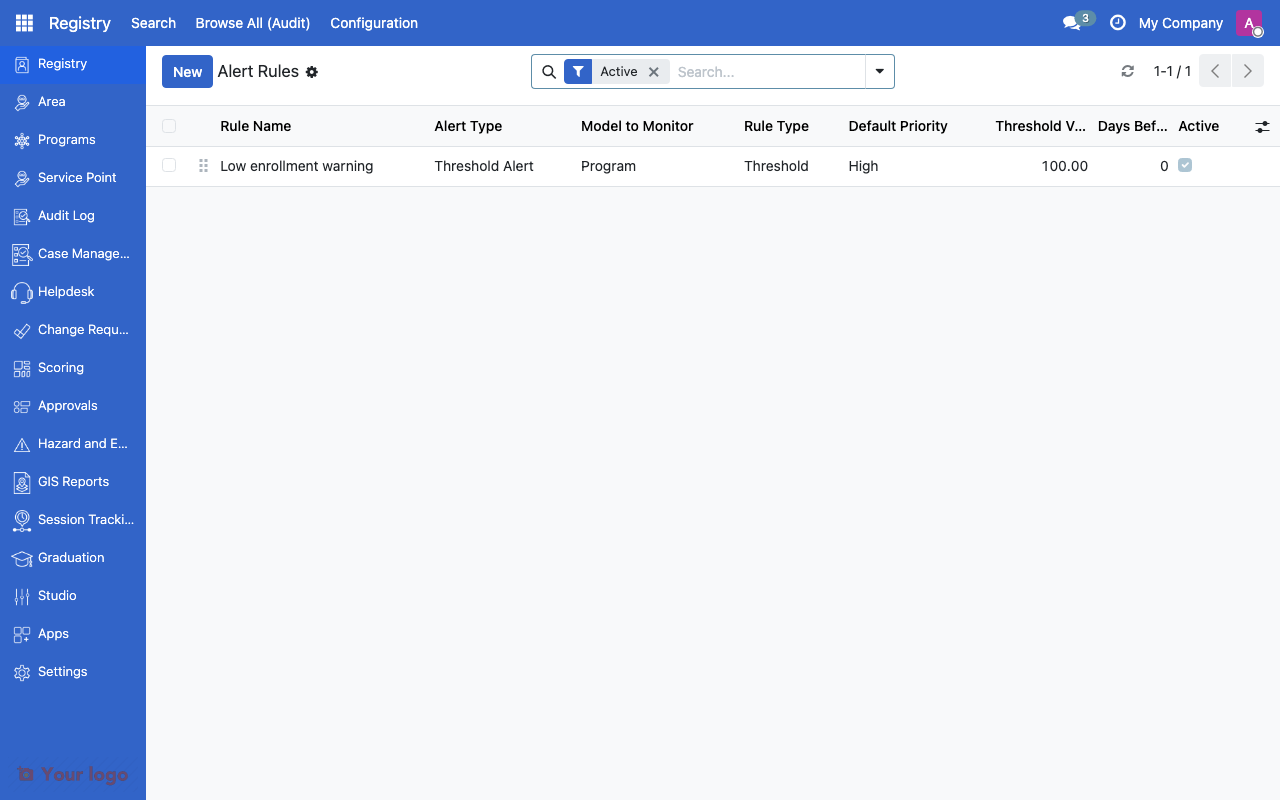
Alert rules list showing rule type, priority, and monitored model.#
Common use cases#
Use case 1: Low stock warning#
Goal: Alert when warehouse stock falls below minimum levels.
Setup:
Create a threshold rule on the stock/inventory model
Monitor the quantity field with operator "lt" and threshold = 100
Set priority to "High"
Add a domain filter for the specific warehouse
Use case 2: Contract expiry reminder#
Goal: Alert 30 days before service point contracts expire.
Setup:
Create a date/deadline rule on the contract model
Select the expiry date field
Set Days Before = 30
Set priority to "Medium"
Use case 3: Budget overspend#
Goal: Alert when a program exceeds its budget allocation.
Setup:
Create a threshold rule on the program model
Monitor the spent amount field with operator "gt" and threshold = budget limit
Set priority to "Critical"
Add a domain filter for active programs only
Use case 4: Enrollment deadline approaching#
Goal: Alert when program enrollment windows are about to close.
Setup:
Create a date/deadline rule on the program cycle model
Select the enrollment end date field
Set Days Before = 7
Set priority to "Medium"
Are You Stuck?#
Alerts not being generated?
Check that the rule is Active and that the Domain Filter (if set) matches existing records. Try clicking "Run Now" to test manually.
Too many alerts generated?
Narrow the Domain Filter to reduce the scope. Adjust the threshold or days-before value to be less sensitive.
Alert types list is empty?
Alert types come from the vocabulary system. Check with your administrator that the "Alerts" vocabulary is configured with the appropriate alert type options.
Can I delete old alerts?
Yes. Alerts are standard records that can be archived or deleted. Consider archiving instead of deleting for audit purposes.
How do I get notified when an alert fires?
Currently, alerts appear in the Alerts menu. For email or push notifications, configure notification rules on the alert model or integrate with your organization's notification system.
Can I create alerts for custom models?
Yes. Most models in OpenSPP can be selected in the Model to Monitor field, as long as they have numeric or date fields to monitor.
Next steps#
Audit configuration overview - Track alert rule changes
Approval workflows overview - Set up approvals triggered by alerts