 openspp.org
Field mappings
Contents
Field mappings#
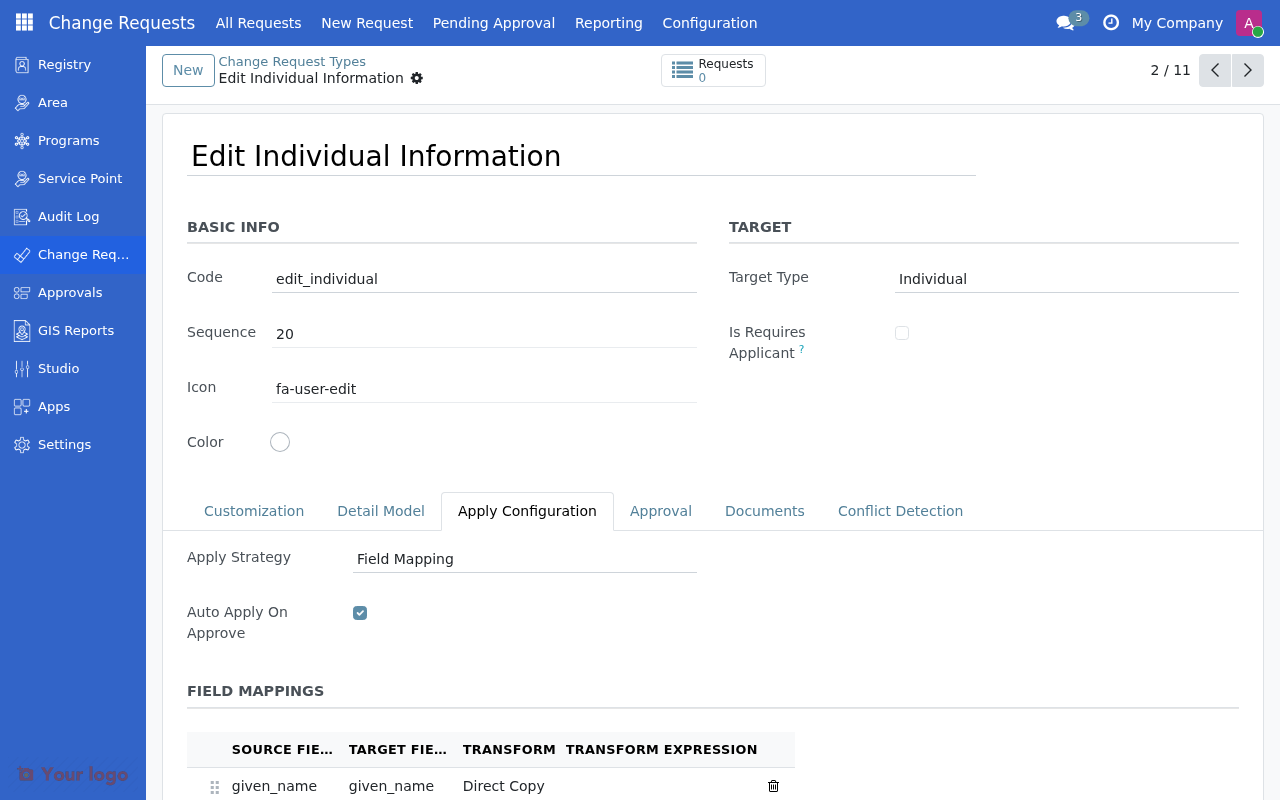
Field mappings define how data from a change request detail model is applied to the target registrant record. This guide covers all mapping options available in OpenSPP.
Apply strategies#
OpenSPP supports three apply strategies:
Strategy |
Description |
Use Case |
|---|---|---|
Field Mapping |
Copies fields from detail to registrant using configured mappings |
Most common - simple field updates |
Custom Method |
Executes Python code for complex logic |
Adding members, splitting households |
Manual Application |
Requires manual intervention to apply |
Complex migrations, bulk corrections |
Basic mapping#
When source and target field names match exactly, use Direct Copy:
Source Field |
Target Field |
Transform |
|---|---|---|
|
|
Direct Copy |
|
|
Direct Copy |
|
|
Direct Copy |
|
|
Direct Copy |
Relational field mapping#
For Many2one fields, map the ID field:
Source Field |
Target Field |
Transform |
|---|---|---|
|
|
Direct Copy |
|
|
Direct Copy |
|
|
Direct Copy |
Note
The system automatically handles .id extraction for relational fields. You don't need to explicitly reference the ID.
Expression-based mapping#
For complex transformations, use expressions. Set the Transform to Expression and provide a Python expression.
Concatenating fields#
Source Field |
Target Field |
Transform |
Expression |
|---|---|---|---|
|
|
Expression |
|
Calculating values#
Source Field |
Target Field |
Transform |
Expression |
|---|---|---|---|
|
|
Expression |
|
Available variables in expressions#
Variable |
Description |
|---|---|
|
The source field value |
|
The entire detail record |
|
The target registrant record |
|
Python datetime module |
|
Python date module |
Warning
Expression-based mappings execute Python code. Only administrators should configure expressions due to arbitrary code execution risk.
Conditional mapping#
Only apply a mapping when a condition is met:
Source Field |
Target Field |
Transform |
Expression |
|---|---|---|---|
|
|
Expression |
|
This example only updates the phone if is_primary is true; otherwise, it keeps the existing value.
More conditional examples#
Update only if not empty:
value if value else registrant.email
Apply different logic based on type:
detail.new_phone if detail.phone_type == 'mobile' else registrant.phone
Format before applying:
value.strip().upper() if value else ''
Custom apply strategies#
For complex operations that can't be expressed with field mappings, use a Custom Method:
Set Apply Strategy to Custom Method
Set Apply Model to the model containing the apply logic
Set Apply Method to the method name (usually
apply)
Available custom strategies#
Model |
Purpose |
|---|---|
|
Add new member to group |
|
Remove member from group |
|
Change head of household |
|
Transfer member between groups |
|
Deactivate registrant |
|
Create new group/household |
|
Split household into two |
|
Merge duplicate records |
Manual application#
For changes that need human review before application:
Set Apply Strategy to Manual
Set Auto Apply On Approve to No
After approval, an administrator manually applies changes
Use cases:
Complex group restructuring
Data migrations
Bulk corrections requiring verification
Troubleshooting mappings#
Field not updating#
Problem: Approved change request doesn't update the registrant field.
Checks:
Is the source field name spelled correctly?
Does the target field exist on
res.partner?Is Auto Apply On Approve enabled?
Check Odoo logs for errors
Expression errors#
Problem: Expression mapping throws an error.
Checks:
Test the expression in Odoo shell first
Ensure all variables are defined
Handle
None/Falsevalues explicitlyCheck for syntax errors
Relational field issues#
Problem: Many2one field not being set.
Checks:
Map the field itself, not
.idEnsure the related record exists
Check access rights to the related model
See also#
Creating change request types - Basic configuration steps
Common configuration patterns - Common configuration patterns
Troubleshooting - More troubleshooting tips