 openspp.org
Advanced eligibility configuration
Contents
Advanced eligibility configuration#
This guide is for implementers handling complex eligibility scenarios including multiple managers, legacy options, and performance optimization.
Multiple eligibility managers#
A program can have multiple eligibility managers that work together. Registrants must pass all managers to be eligible.
        graph LR
    R[Registrants] --> E1[Manager 1:<br/>Demographics]
    E1 --> E2[Manager 2:<br/>Geographic]
    E2 --> E3[Manager 3:<br/>Economic]
    E3 --> Q[Eligible]
When to use multiple managers#
Scenario |
Manager setup |
|---|---|
Layered targeting |
Demographics → Geography → Income |
Phased rollout |
Core criteria + Phase-specific filters |
Complex programs |
Different criteria for different components |
Policy separation |
Separate managers for different policy requirements |
Configuring multiple managers#
Open the program's Configuration tab
In the Eligibility Manager section, click Add a line
Configure each manager with its specific criteria
Managers are evaluated in sequence (top to bottom)
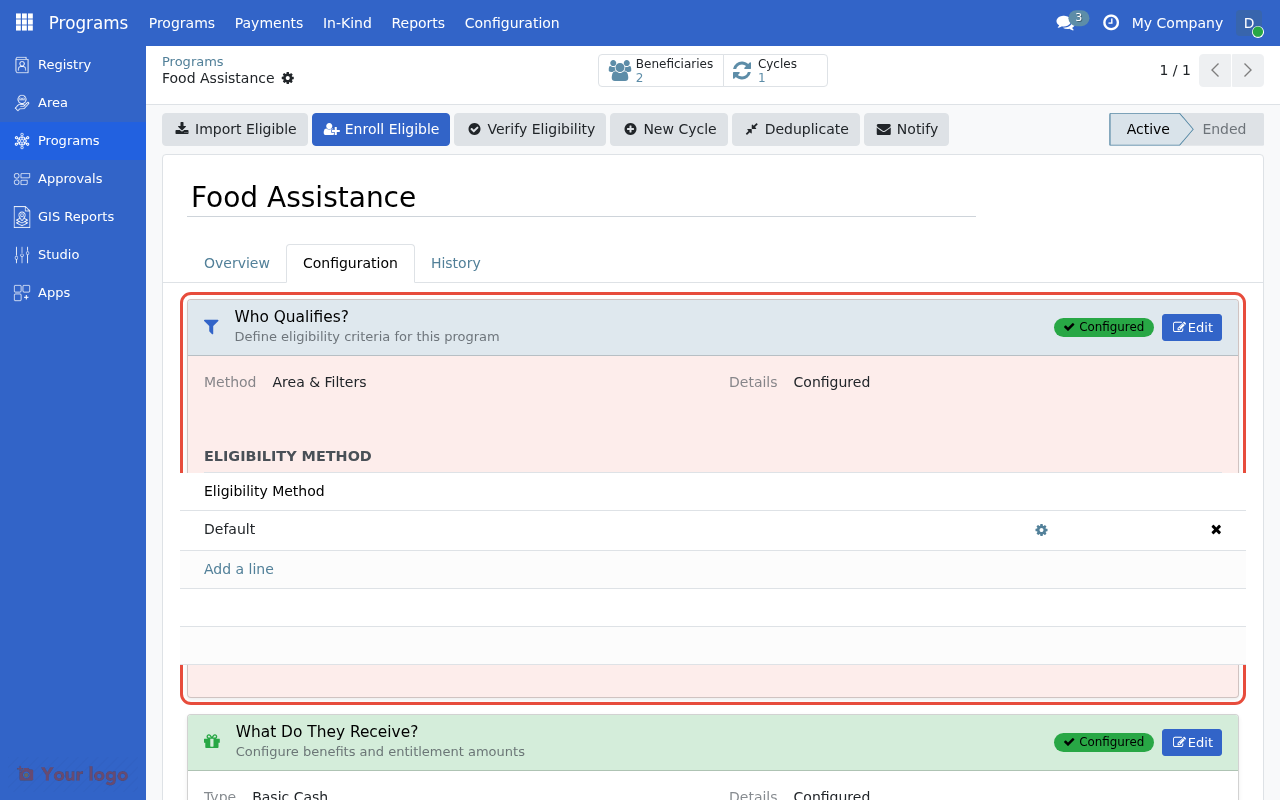
The Eligibility Manager section in the program's Configuration tab. Click Add a line to add additional managers.#
Evaluation order#
Managers are evaluated in display order. A registrant must pass all managers:
Manager |
Criteria |
Registrant A |
Registrant B |
|---|---|---|---|
Manager 1 |
Age ≥ 60 |
✓ Pass |
✓ Pass |
Manager 2 |
In target areas |
✓ Pass |
✗ Fail |
Manager 3 |
PMT < 25 |
✓ Pass |
— |
Result |
Eligible |
Not Eligible |
Best practices for multiple managers#
Do |
Don't |
|---|---|
Order from broad to specific |
Create overlapping criteria |
Document each manager's purpose |
Use more than 3-4 managers |
Keep each manager focused |
Mix unrelated criteria in one manager |
Compliance criteria#
In addition to eligibility (who can enroll), you can configure compliance criteria (who remains compliant during a cycle).
Eligibility vs compliance#
Type |
When evaluated |
Effect |
|---|---|---|
Eligibility |
At enrollment |
Determines who can join the program |
Compliance |
During cycle |
Marks non-compliant beneficiaries |
Configuring compliance#
Open the eligibility manager settings
Find the Compliance Criteria (CEL) section
Write a CEL expression for compliance rules
Example compliance criteria#
# Children must remain enrolled in school
members.exists(m, age_years(m.birthdate) >= 6 and age_years(m.birthdate) <= 18 and m.enrolled_in_school)

# Health checkup completed this quarter
has_event('health_checkup', within_days=90)
Applying compliance in cycles#
During a cycle:
Open the cycle in Draft or To Approve state
Click the Compliance Criteria button
Beneficiaries not meeting criteria are marked non-compliant
Event data in eligibility#
For programs requiring event-based criteria (surveys, assessments), CEL supports event functions:
Event functions#
Function |
Description |
Example |
|---|---|---|
|
Access most recent event |
|
|
Check if event exists |
|
|
Count events |
|
Temporal filters#
Filter |
Description |
Example |
|---|---|---|
|
Within last N days |
|
|
Within last N months |
|
|
Within calendar year |
|
Example: Survey-based eligibility#
# Household completed recent survey with income below threshold
has_event('household_survey', within_months=12) and event('household_survey').monthly_income < 50000
Legacy eligibility methods#
OpenSPP includes legacy eligibility methods for backward compatibility.
SQL-based eligibility#
Note
SQL-based eligibility is in the archived modules. Use CEL expressions for new programs.
SQL eligibility allows custom database queries for maximum flexibility:
Field |
Description |
|---|---|
SQL Query |
Custom SQL returning partner IDs |
Validation Status |
Valid/Invalid/Recheck |
Record Count |
Number of matching registrants |
Limitations:
Requires SQL knowledge
No real-time validation
Security concerns with raw SQL
Tag-based eligibility#
Note
Tag-based eligibility is in the archived modules. Use CEL expressions for new programs.
Tag eligibility targets registrants with specific tags:
Field |
Description |
|---|---|
Tag |
Target registrant tag |
Area |
Optional area restriction |
Use case: Simple inclusion/exclusion based on pre-assigned tags.
Manual eligibility#
Manual eligibility allows program staff to select beneficiaries individually:
Feature |
Description |
|---|---|
Manual selection |
Staff picks beneficiaries from registry |
Approval workflow |
Selected beneficiaries require approval |
Override criteria |
Can override automated eligibility |
Performance optimization#
For large-scale programs (millions of registrants), optimize eligibility evaluation:
CEL compilation#
CEL expressions compile to database queries for efficient evaluation:
# This CEL expression:
age_years(r.birthdate) >= 65 and is_female(r.gender_id)

# Compiles to SQL domain:
[('birthdate', '<=', '1960-01-01'), ('gender_id.name', '=', 'Female')]
Performance best practices#
Practice |
Benefit |
|---|---|
Use indexed fields |
Faster query execution |
Avoid complex member iterations |
Reduces computation |
Test at scale |
Verify performance with production data volumes |
Use geographic targeting |
Reduces candidate pool early |
Indexing recommendations#
Ensure database indexes exist for commonly filtered fields:
Field |
Index type |
|---|---|
|
Standard index |
|
Standard index |
|
Standard index |
|
Standard index |
Large-scale testing#
Before production deployment:
Test eligibility evaluation with full registry data
Monitor database query performance
Optimize expressions if evaluation exceeds acceptable time
Audit and governance#
Template governance#
Use locked templates for standardized criteria:
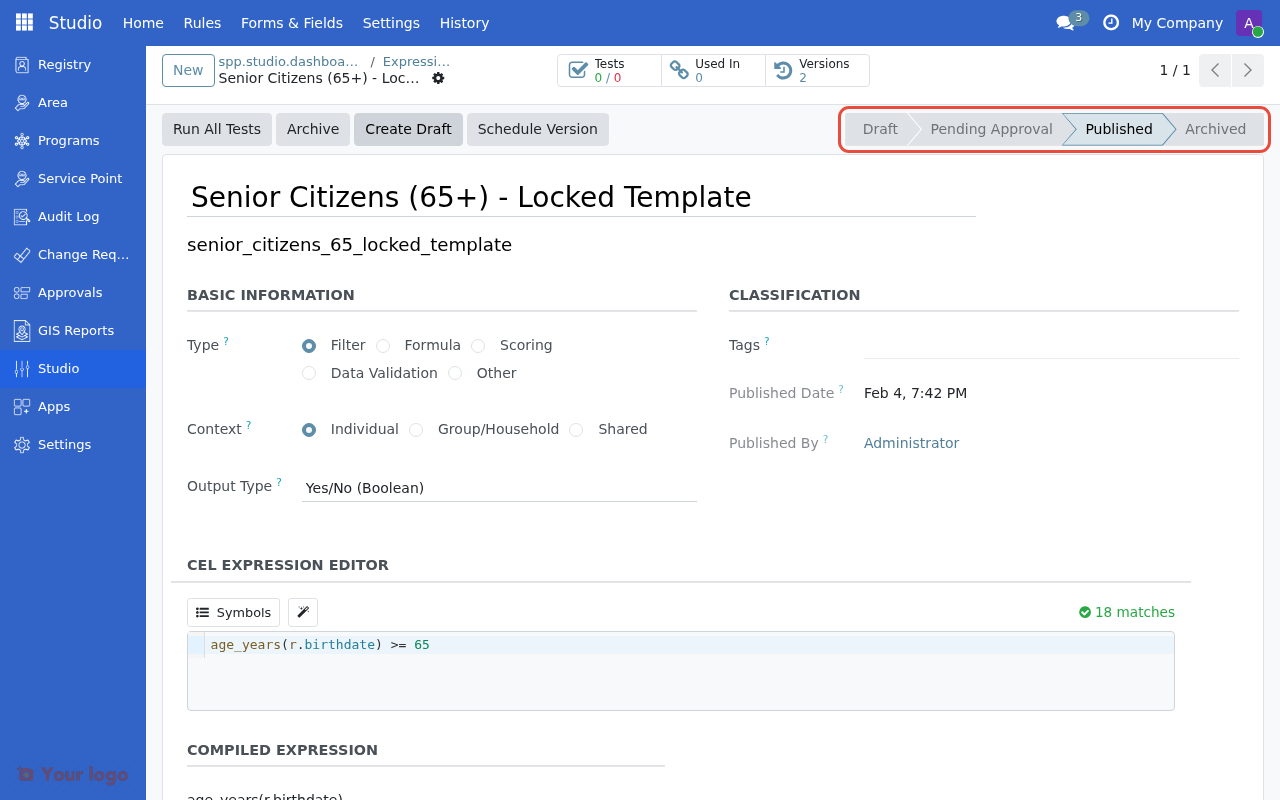
A locked template displays a warning when you attempt to modify the expression, preventing unauthorized changes.#
Feature |
Purpose |
|---|---|
Locked templates |
Prevent unauthorized modifications |
Template lineage |
Track which template was used |
Drift detection |
Identify modified expressions |
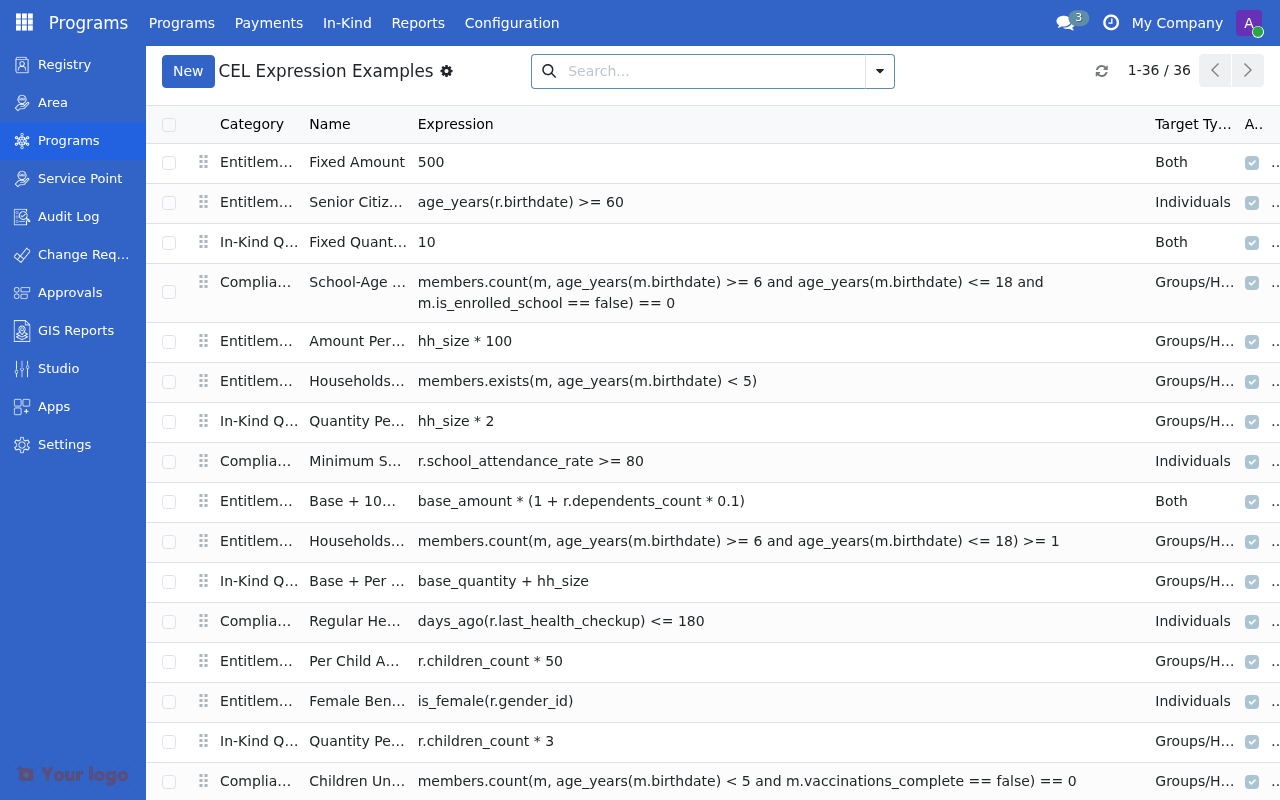
The CEL Expression Examples list where templates are managed. Each template has a category, name, expression, and target type for governance tracking.#
Audit trail#
OpenSPP logs eligibility operations:
Event |
Logged information |
|---|---|
Expression change |
Old/new expression, user, timestamp |
Import execution |
Count, duration, user |
Verification |
Results, user, timestamp |
Compliance considerations#
Requirement |
Implementation |
|---|---|
Standardized criteria |
Use locked templates |
Audit trail |
Enable logging |
Approval workflow |
Require approval for eligibility changes |
Documentation |
Document criteria rationale |
Troubleshooting complex scenarios#
Multiple managers not working as expected#
Issue: Registrants fail even though they meet all criteria.
Check:
Verify manager order (top to bottom)
Check each manager's expression individually
Look for null data causing failures
Performance degradation#
Issue: Eligibility evaluation is slow.
Check:
Review expression complexity
Check for missing database indexes
Consider breaking into multiple managers with geographic filter first
Expression compiles but returns wrong results#
Issue: Valid expression returns unexpected matches.
Check:
Verify field names match schema exactly
Check data types (string vs number)
Review null handling
Test with known data samples
Are you stuck?#
Multiple managers conflict?
Managers apply ALL conditions (AND logic)
To use OR logic, combine criteria in a single CEL expression
Event functions not working?
Verify event data exists for registrants
Check event type names match exactly
Ensure temporal filters are appropriate
SQL eligibility returns errors?
Validate SQL syntax separately
Ensure query returns only partner IDs
Check for DML statements (not allowed)
Performance issues at scale?
Profile database queries
Add appropriate indexes
Consider breaking complex expressions into multiple managers
Next steps#
CEL expressions for eligibility - Master CEL syntax
Testing eligibility rules - Validate complex configurations
Eligibility Manager - Technical API reference