 openspp.org
In-kind and basket entitlements
Contents
In-kind and basket entitlements#
This guide is for implementers configuring in-kind (physical goods) entitlements and predefined product baskets.
Understanding in-kind entitlements#
In-kind entitlements distribute physical goods instead of cash. Common examples:
Program type |
In-kind items |
|---|---|
Food assistance |
Rice, cooking oil, beans |
Agricultural support |
Seeds, fertilizer, tools |
School supplies |
Books, uniforms, materials |
Emergency relief |
Blankets, tarps, hygiene kits |
In-kind vs basket entitlements#
Type |
Description |
Use case |
|---|---|---|
In-Kind |
Single product per item |
Simple distributions |
Basket |
Multiple products bundled |
Standardized aid packages |
Configuring in-kind entitlements#
Creating an in-kind entitlement manager#
Open your program's Configuration tab
In Entitlement Manager, click Add a line
Select In-Kind as the manager type
Configure the in-kind items
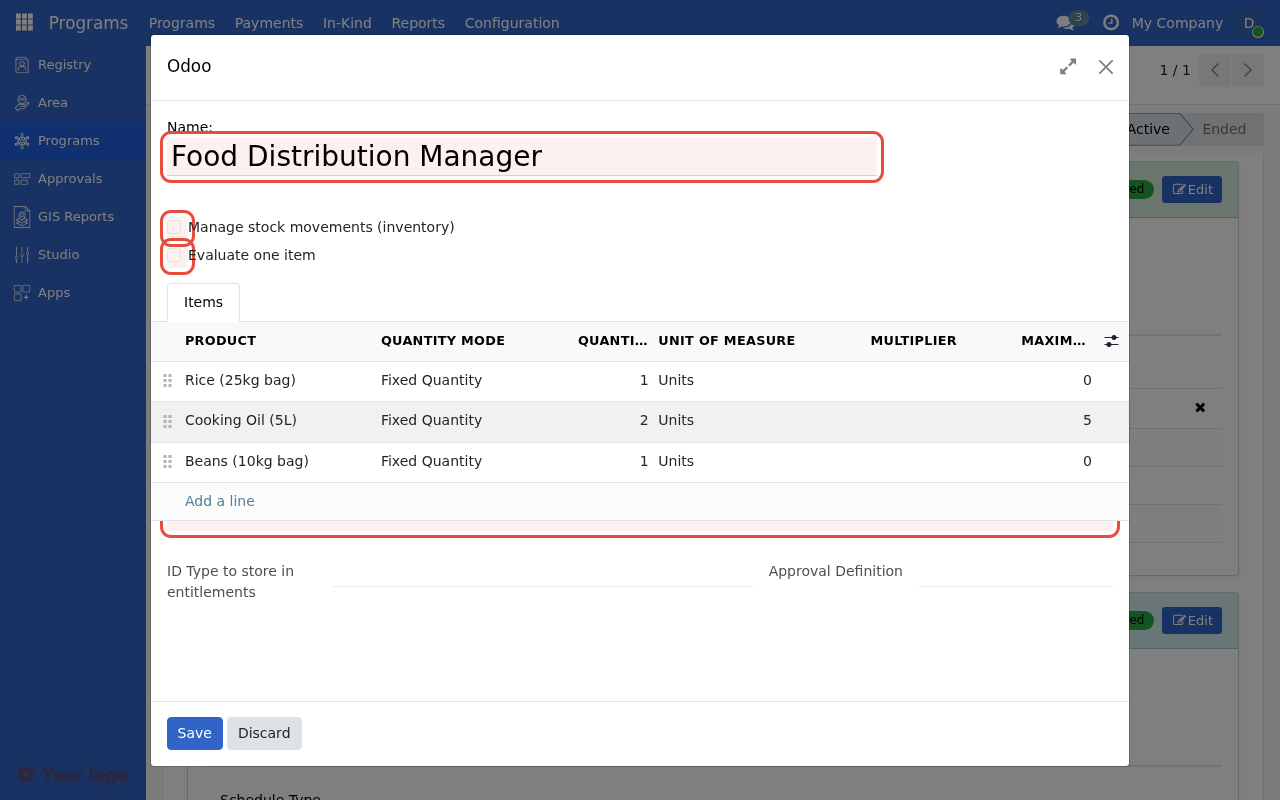
The In-Kind entitlement manager form with Manage Inventory, Evaluate Single Item, and the Items list.#
In-kind manager settings#
Field |
Description |
|---|---|
Name |
Display name for this manager |
Warehouse |
Source warehouse for inventory |
Entitlement Items |
List of products to distribute |
Adding in-kind items#
Each item specifies a product and quantity:
Field |
Description |
Example |
|---|---|---|
Product |
Item from product catalog |
Rice (25kg bag) |
Quantity |
Amount per beneficiary |
|
Unit of Measure |
How quantity is measured |
Bags, kg, pieces |
Condition |
Who receives this item |
(optional CEL) |
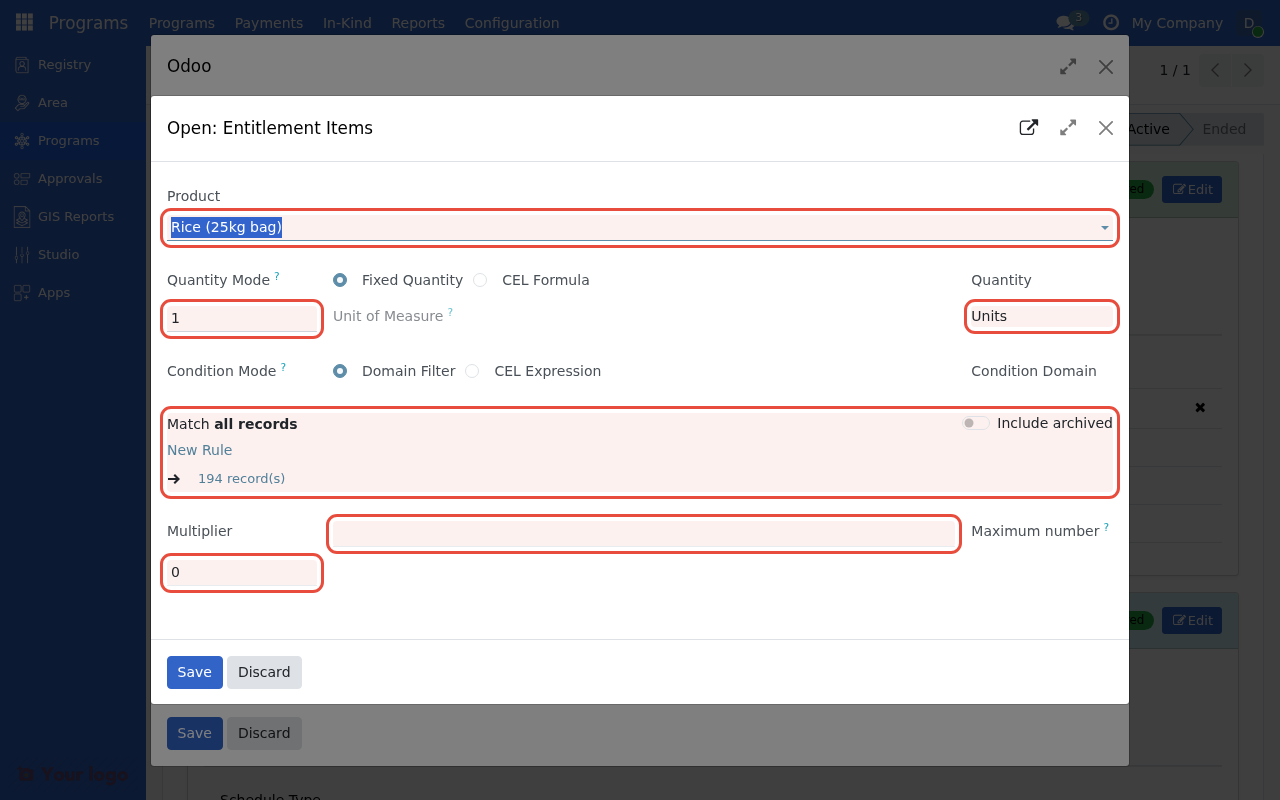
Configure each item with a Product, Quantity, Condition, and optional Multiplier field.#
Product configuration#
Setting up products#
Products must be configured in the system before use:
Go to Inventory → Products
Create or select a product
Configure product details
Field |
Description |
|---|---|
Name |
Product display name |
Type |
Storable Product (for inventory tracking) |
Unit of Measure |
Default measurement unit |
Category |
Product categorization |
Product categories for social protection#
Organize products by category:
Category |
Products |
|---|---|
Food Staples |
Rice, beans, flour, oil |
Agricultural Inputs |
Seeds, fertilizer, pesticides |
Household Items |
Blankets, cookware, containers |
Hygiene |
Soap, sanitizer, menstrual products |
Warehouse integration#
In-kind entitlements integrate with inventory management:
Warehouse configuration#
Field |
Description |
|---|---|
Source Warehouse |
Where products are stored |
Service Points |
Distribution locations |
Inventory tracking#
When entitlements are prepared:
System checks available stock
Reserves inventory for entitlements
Reduces stock on distribution
Tracks redemption status
Note
Ensure sufficient stock exists before preparing entitlements. Low stock warnings appear if inventory is insufficient.
Basket entitlements#
Baskets bundle multiple products into a single entitlement.
Creating a basket#
Go to Programs → Configuration → Entitlement Baskets
Click Create
Add products to the basket
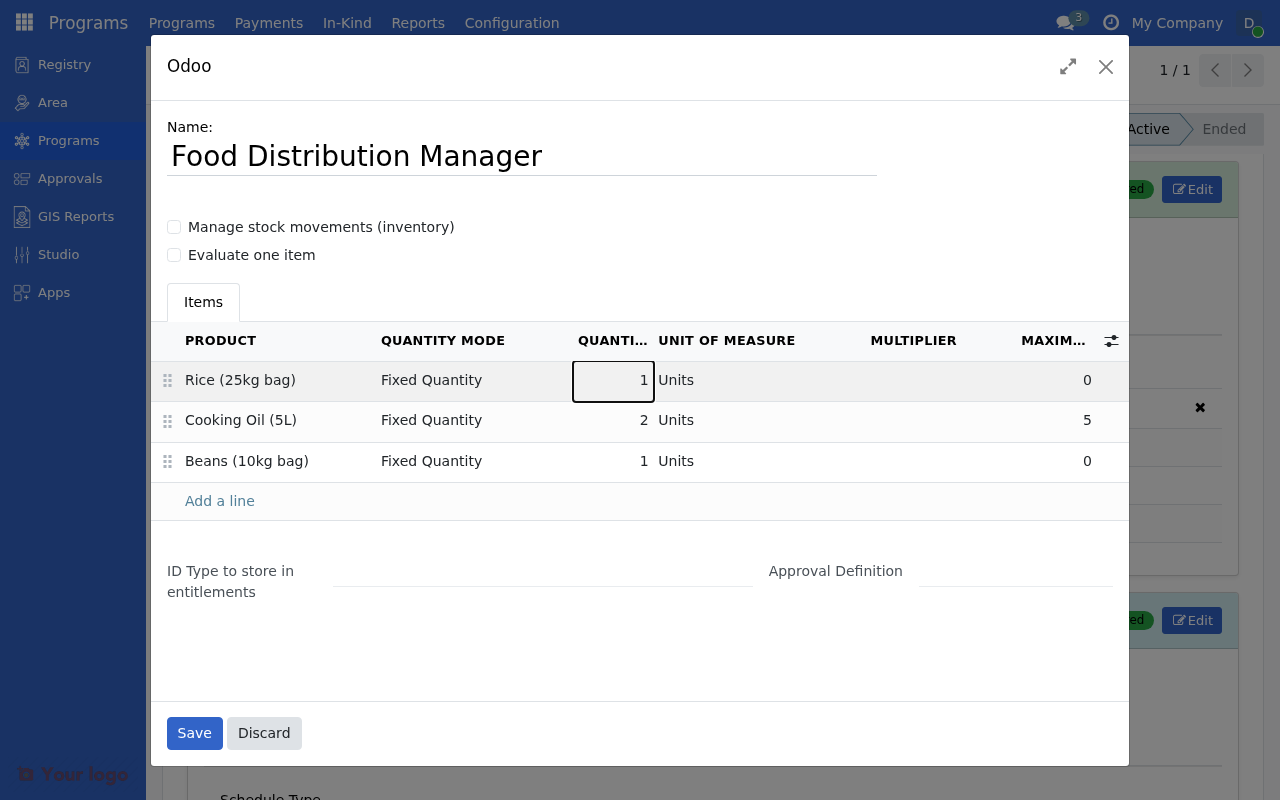
Multiple items configured with different products, quantities, and conditions for distribution.#
Basket configuration#
Field |
Description |
|---|---|
Name |
Basket display name |
Products |
List of included products |
Quantities |
Amount of each product |
Example: Emergency relief basket#
Product |
Quantity |
Unit |
|---|---|---|
Blanket |
2 |
pieces |
Tarpaulin |
1 |
piece |
Water container |
2 |
pieces |
Hygiene kit |
1 |
kit |
Rice |
10 |
kg |
Using baskets in entitlement managers#
Create a basket entitlement manager
Select the predefined basket
Configure conditions if needed
Quantity multipliers#
Scale quantities based on beneficiary attributes:
Per-household-member distribution#
Field |
Value |
|---|---|
Product |
Rice (1kg) |
Base Quantity |
|
Multiplier Field |
|
Result: 1kg rice per household member
Maximum quantities#
Set limits on multiplied quantities:
Field |
Value |
|---|---|
Quantity |
|
Multiplier Field |
|
Max Multiplier |
|
Result: Maximum 10kg regardless of household size
Conditional in-kind items#
Different items for different beneficiaries:
Example: Age-based items#
Item 1: Rice for all
Field |
Value |
|---|---|
Product |
Rice |
Quantity |
5 |
Condition |
(empty) |
Item 2: Baby food for households with infants
Field |
Value |
|---|---|
Product |
Baby formula |
Quantity |
2 |
Condition |
|
Example: Geographic items#
Field |
Value |
|---|---|
Product |
Winter blanket |
Quantity |
2 |
Condition |
|
Distribution workflow#
Preparing in-kind entitlements#
Open the cycle
Click Prepare Entitlements
System calculates items for each beneficiary
Draft entitlements are created
Approving in-kind entitlements#
Review entitlement list
Verify quantities and products
Approve entitlements
Inventory is reserved
Distribution/redemption#
Method |
Description |
|---|---|
Direct distribution |
Items delivered to beneficiaries |
Service point redemption |
Beneficiaries collect at designated locations |
Voucher exchange |
Vouchers redeemed for products |
Service points#
Configure where beneficiaries collect in-kind items:
Field |
Description |
|---|---|
Name |
Service point name |
Location |
Physical address |
Warehouse |
Associated warehouse |
Operating Hours |
When open for distribution |
Tracking redemption#
For in-kind entitlements:
State |
Description |
|---|---|
Draft |
Entitlement created |
Approved |
Ready for distribution |
Partially Redeemed |
Some items collected |
Fully Redeemed |
All items collected |
Best practices#
Product management#
Practice |
Benefit |
|---|---|
Use consistent product names |
Clear reporting |
Set up proper units of measure |
Accurate quantities |
Maintain product categories |
Easy organization |
Inventory planning#
Practice |
Benefit |
|---|---|
Check stock before preparing |
Avoid shortfalls |
Plan procurement cycles |
Ensure availability |
Track expiration dates |
Prevent waste |
Distribution efficiency#
Practice |
Benefit |
|---|---|
Use baskets for standard packages |
Faster distribution |
Pre-pack items where possible |
Reduce wait times |
Track redemption rates |
Identify issues |
Are you stuck?#
Products not appearing in selection?
Verify products are created in Inventory → Products
Check product type is "Storable Product"
Ensure you have access to the product category
Inventory insufficient warning?
Check warehouse stock levels
Verify correct warehouse is selected
Plan procurement before preparing entitlements
Quantities seem wrong?
Review multiplier field configuration
Check max multiplier setting
Verify beneficiary data has values
Basket products missing?
Ensure basket is properly configured
Check all products in basket are active
Verify product stock availability
Next steps#
Conditional logic - Complex conditions for items
Dynamic entitlements - Household-based quantities
Manage entitlements - Distribution workflow