 openspp.org
Service Points
Contents
Service Points#
This article explains how the service points module works in OpenSPP and how it can be customized, using a practical scenario and a working example. The spp_service_points module provides the foundation for managing service delivery locations in OpenSPP, which can be used in programs and other modules.
Core Models
The spp_service_points module provides the core service point management functionality with the following components:
spp.service.point: The main service point model that manages service delivery locations.spp.service.type: Defines different types of services offered at service points.res.partner: Extended to include service point relationships for individuals and companies.
Key Features
Service point management with geographical area linking.
Service type categorization and tagging.
Company and individual associations.
Phone number validation and sanitization.
Service point status management (active/disabled).
User account creation for service point contacts.
Integration with area management system.
Integration with Other Modules
Service points can be integrated with other OpenSPP modules:
Area Management: Link service points to geographical areas.
Programs: Associate service points with specific programs.
Entitlements: Use service points for entitlement redemption and distribution.
Beneficiary Management: Connect service points to beneficiary groups and individuals.
Prerequisites#
Solid understanding of Odoo 17 module development, including Python, XML, and XPath.
The "OpenSPP Service Points Management" (spp_service_points) module must be installed.
To set up OpenSPP for development, please refer to the Development Setup Guide.
Module Structure#
A typical custom service points module follows the standard Odoo module structure. Here’s the structure for the example module, spp_service_point_custom:
spp_service_point_custom/
├── __init__.py
├── __manifest__.py
├── models/
│   ├── __init__.py
│   └── service_point.py
├── views/
│   └── service_point_views.xml
└── data/
    └── service_type_data.xml
Step-by-Step Guide#
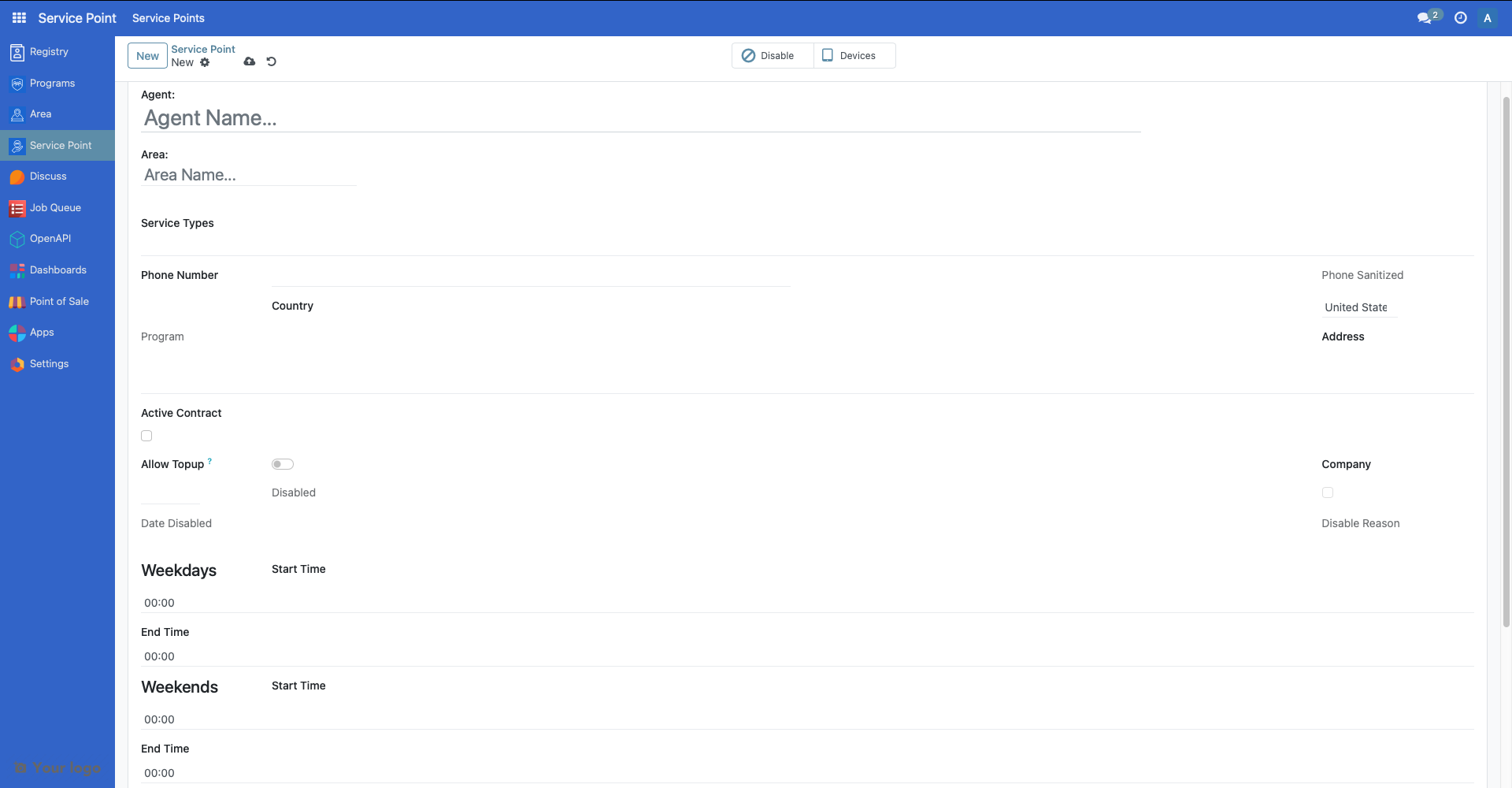
In this scenario, we customize the service points module to include operating hours, capacity, and additional contact information. This helps beneficiaries know when and where they can redeem their entitlements.
Create the Module Scaffold#
Create a new directory for your module (e.g., spp_service_point_custom) and populate it with the basic Odoo module files and the directory structure shown above.
Define Module Manifest#
Create a manifest file that includes the proper dependencies and data files:
{
    "name": "OpenSPP Service Point Custom Extensions",
    "summary": "Custom extensions for OpenSPP Service Point Management",
    "category": "OpenSPP",
    "version": "17.0.1.0.0",
    "author": "Your Organization",
    "website": "https://your-website.com",
    "license": "LGPL-3",
    "depends": [
        "spp_service_points",
    ],
    "data": [
        "views/service_point_views.xml",
        "data/service_type_data.xml",
    ],
    "application": False,
    "installable": True,
    "auto_install": False,
}
Extend the Service Point Model#
Create a Python file named service_point.py that extends the spp.service.point model and add it to models/__init__.py:
from odoo import fields, models, api
from odoo.exceptions import ValidationError

class OpenSPPServicePoint(models.Model):
    _inherit = "spp.service.point"

    # Operating hours fields
    weekday_start = fields.Float(
        string="Weekday Start Time",
        help="Start time for weekdays (Monday-Friday) in 24-hour format"
    )
    weekday_end = fields.Float(
        string="Weekday End Time",
        help="End time for weekdays (Monday-Friday) in 24-hour format"
    )
    weekend_start = fields.Float(
        string="Weekend Start Time",
        help="Start time for weekends (Saturday-Sunday) in 24-hour format"
    )
    weekend_end = fields.Float(
        string="Weekend End Time",
        help="End time for weekends (Saturday-Sunday) in 24-hour format"
    )

    # Additional service point information
    capacity = fields.Integer(
        string="Daily Capacity",
        help="Maximum number of beneficiaries that can be served per day"
    )
    contact_email = fields.Char(
        string="Contact Email",
        help="Primary contact email for the service point"
    )
    emergency_contact = fields.Char(
        string="Emergency Contact",
        help="Emergency contact number for the service point"
    )

    # Computed field for operating hours display
    operating_hours_display = fields.Char(
        string="Operating Hours",
        compute="_compute_operating_hours_display",
        store=True,
        help="Formatted display of operating hours"
    )

    @api.depends("weekday_start", "weekday_end", "weekend_start", "weekend_end")
    def _compute_operating_hours_display(self):
        for record in self:
            hours_display = []
            if record.weekday_start and record.weekday_end:
                weekday_start = f"{int(record.weekday_start):02d}:{int((record.weekday_start % 1) * 60):02d}"
                weekday_end = f"{int(record.weekday_end):02d}:{int((record.weekday_end % 1) * 60):02d}"
                hours_display.append(f"Weekdays: {weekday_start}-{weekday_end}")
            if record.weekend_start and record.weekend_end:
                weekend_start = f"{int(record.weekend_start):02d}:{int((record.weekend_start % 1) * 60):02d}"
                weekend_end = f"{int(record.weekend_end):02d}:{int((record.weekend_end % 1) * 60):02d}"
                hours_display.append(f"Weekends: {weekend_start}-{weekend_end}")
            record.operating_hours_display = " | ".join(hours_display) if hours_display else "Not specified"

    @api.constrains("weekday_start", "weekday_end")
    def _check_weekday_hours(self):
        for record in self:
            if record.weekday_start and record.weekday_end:
                if record.weekday_start >= record.weekday_end:
                    raise ValidationError("Weekday start time must be before end time.")

    @api.constrains("weekend_start", "weekend_end")
    def _check_weekend_hours(self):
        for record in self:
            if record.weekend_start and record.weekend_end:
                if record.weekend_start >= record.weekend_end:
                    raise ValidationError("Weekend start time must be before end time.")

    @api.constrains("capacity")
    def _check_capacity_positive(self):
        for record in self:
            if record.capacity and record.capacity < 0:
                raise ValidationError("Daily capacity cannot be negative.")
Create View Extensions#
Create a new file called views/service_point_views.xml in the module and add it to the manifest file:
<odoo>
    <record id="view_service_points_form_custom" model="ir.ui.view">
        <field name="name">view_service_points_form_custom</field>
        <field name="model">spp.service.point</field>
        <field name="inherit_id" ref="spp_service_points.view_service_points_form" />
        <field name="arch" type="xml">
            <xpath expr="//field[@name='disabled_reason']" position="after">
                <group string="Operating Hours" name="operating_hours">
                    <group string="Weekdays (Monday-Friday)">
                        <field name="weekday_start" widget="float_time" />
                        <field name="weekday_end" widget="float_time" />
                    </group>
                    <group string="Weekends (Saturday-Sunday)">
                        <field name="weekend_start" widget="float_time" />
                        <field name="weekend_end" widget="float_time" />
                    </group>
                </group>
                <group string="Additional Information" name="additional_info">
                    <field name="operating_hours_display" readonly="1" />
                    <field name="capacity" />
                    <field name="contact_email" />
                    <field name="emergency_contact" />
                </group>
            </xpath>
        </field>
    </record>
    <record id="view_service_points_tree_custom" model="ir.ui.view">
        <field name="name">view_service_points_tree_custom</field>
        <field name="model">spp.service.point</field>
        <field name="inherit_id" ref="spp_service_points.view_service_points_tree" />
        <field name="arch" type="xml">
            <xpath expr="//field[@name='is_disabled']" position="after">
                <field name="operating_hours_display" string="Operating Hours" />
                <field name="capacity" string="Daily Capacity" />
            </xpath>
        </field>
    </record>
</odoo>
Add Custom Service Types#
Create data/service_type_data.xml to add custom service types:
<odoo>
    <data noupdate="1">
        <record id="service_type_voucher_redemption" model="spp.service.type">
            <field name="name">Voucher Redemption Center</field>
        </record>
        <record id="service_type_in_kind_distribution" model="spp.service.type">
            <field name="name">In-Kind Goods Distribution</field>
        </record>
        <record id="service_type_information_desk" model="spp.service.type">
            <field name="name">Information Desk</field>
        </record>
        <record id="service_type_cash_payment" model="spp.service.type">
            <field name="name">Cash Payment Center</field>
        </record>
        <record id="service_type_health_services" model="spp.service.type">
            <field name="name">Health Services</field>
        </record>
    </data>
</odoo>
Install and Test#
Install or upgrade the module through the Apps menu.
Test the new fields in the service point forms and lists.
The following screenshot shows the newly added fields in the developed module:
References#
For more information on extending OpenSPP modules, refer to: